

 English


How to judge whether the wireless module is broken?
In the process of using thewireless module, you will encounter various situations. The most feared thing is that the wireless module fails to work nor
Sep . 2025
This chapter provides a summary of all known configuration and operation commands for the UWB650 module, intended to serve as a comprehensive and quick reference for software development engineers. The UWB650 module uses configuration commands to modify some of its runtime parameters.
<...>: Parameter name. The angle brackets do not appear in the actual command.
When a user inputs data through the serial port, the module detects whether the data is a configuration command and processes and responds accordingly. The format of configuration commands is fixed: it starts with UWBRFAT and ends with
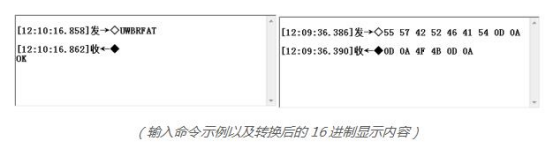
Throughout this document,
The UWB650 module uses a timeout detection method to determine the number of bytes received from the serial port. When the module receives the first byte, it starts a timer of about 5ms. If it continues to receive other bytes, the timer is reset. Reception stops and data processing begins either when the receive buffer is full or when the timer triggers a timeout.
1) Check if the module is working properly
Command | Response |
UWBRFAT | OK |
2) Get module firmware version
Command | Response |
UWBRFAT+VERSION? | V1.2 |
Note: Since the module firmware may be updated later, the response content in this document is for reference only.
3) Restore all module parameters to default values
Command | Response |
UWBRFAT+DEFAULT | OK |
Note: This command will cause the module to restart. The module responds with OK before executing the restart operation.
After the module starts up, the serial port will output the following string:
Finished Startup
4) Reboot the module
Command | Response |
UWBRFAT+RESET | OK |
Note: This command will cause the module to restart. The module responds with OK before executing the restart operation.
After the module starts up, the serial port will output the following string:
Finished Startup
5) Save configurable parameters to internal Flash
Command | Response |
UWBRFAT+FLASH | OK |
Note: In the subsequent configuration command descriptions, commands marked with * indicate that their related parameters can be saved to Flash using this command. These parameters will be applied directly upon subsequent module restarts.
6) Configure the module's serial port baud rate
Command | Response | |
Query | UWBRFAT+BAUDRATE? | +BAUDRATE= |
Set | *UWBRFAT+BAUDRATE= | OK |
Description |
0:230400bps 1:115200bps(Default) 2:57600bps 3.38400bps 4.19200bps 5.9600bps Note: Other configurations of the module's serial port are fixed: 8 data bits, 1 stop bit, no parity bit, no flow control. | |
Example | Query the current serial port baud rate of the module: Send:UWBRFAT+BAUDRATE? Response:+BAUDRATE=0 Set the module's serial port baud rate to 9600: Response:OK Error Example: Send:UWBRFAT+BAUDRATE=6 Response:Error | |
7) Configure the UWB chip's air data rate
Command | Response | |
Query | UWBRFAT+DATARATE? | +DATARATE= |
Set | *UWBRFAT+DATARATE= | OK |
Description | 0:850Kbps 1:6.8Mbps(Default) | |
Example | Query the air data rate: Response:+DATARATE=1 Set the air data rate: Response:OK Error Example: Send:UWBRFAT+DATARATE=2 Response:Error | |
8) Configure the UWB chip's PAN ID and Address
Command | Response | |
Query | UWBRFAT+DEVICEID? | +DEVICEID= |
Set | *UWBRFAT+DEVICEID= | OK |
Description | ||
Example | QueryPAN ID and Address: Send:UWBRFAT+DEVICEID? Response:+DEVICEID=1234,5678 SetPAN ID and Address: Send:UWBRFAT+DEVICEID=ABCD,1234 Response:OK Error Example: Send:UWBRFAT+DEVICEID=FFFF,FFFF Response:Error | |
9) Configure the module's transmit power
Command | Response | |||||||||||||||||||||||||
Query | UWBRFAT+POWER? | +POWER= | ||||||||||||||||||||||||
Set | *UWBRFAT+POWER= | OK | ||||||||||||||||||||||||
Description |
| |||||||||||||||||||||||||
Example | Query the module's transmit power: Response:+POWER=0 Set the transmit power: Response:OK Error Example: Send:UWBRFAT+POWER=11 Response:Error | |||||||||||||||||||||||||
10) Configure the UWB chip's preamble code parameter
Command | Response | |
Query | UWBRFAT+PREAMBLECODE? | +PREAMBLECODE= |
Set | *UWBRFAT+PREAMBLECODE= | OK |
Description |
| |
Example | Query the preamble code parameter: Response:+PREAMBLECODE=9 Set the preamble code parameter: Response:OK Error Example: Send:UWBRFAT+PREAMBLECODE=3 Response:Error | |
11) Configure CCA (Clear Channel Assessment) function
Command | Response | |
Query | UWBRFAT+CCAENABLE? | +CCAENABLE= |
Set | *UWBRFAT+CCAENABLE= | OK |
Description | 0: Disable CCA function (Default) 1: Enable CCA function This function is only used in data transmission mode. After enabling CCA, if the module detects ongoing data transmission in the air before sending normal data, it will stop sending. The serial port will reply with the following: CCA FAILURE | |
Example | Query if CCA function is enabled: Send:UWBRFAT+ CCAENABLE? Response:+CCAENABLE=0 Enable CCA function: Send:UWBRFAT+CCAENABLE=1 Response:OK Error Example: Send:UWBRFAT+CCAENABLE=2 Response:Error | |
12) Configure ACK (Automatic Response Request) function
Command | Response | |
Query | UWBRFAT+ACKENABLE? | +ACKENABLE= |
Set | *UWBRFAT+ACKENABLE= | OK |
Description |
1: Enable ACK send request ACK WAIT TIMEOUT If an ACK reply is received, the serial port will reply with the following: ACK DETECTED | |
Example | Query if ACK function is enabled: Send:UWBRFAT+ACKENABLE? Response:+ACKENABLE=0 Enable ACK function: Response:OK Error Example: Send:UWBRFAT+ACKENABLE=2 Response:Error | |
13) Configure the module's AES-128 key
Command | Response | |
Query | UWBRFAT+SECURITY? | +SECURITY= |
Set | *UWBRFAT+SECURITY= | OK |
Description | 0: Disable AES encryption (Default) 1: Enable AES encryption Default:000102030405060708090A0B0C0D0E0F | |
Example | Query the status of the AES encryption function and the key: Send:UWBRFAT+SECURITY? Response:+SECURITY=0,00112233445566778899AABBCCDDEEFF Enable AES encryption and set the key: Send:UWBRFAT+SECURITY=1,112233445566778899AABBCCDDEEFF00 Response:OK Error Example: Send:UWBRFAT+SECURITY=112233445566778899AABBCCDDEEFF00 Response:Error | |
14) Set the data transmission target address
Command | Response | |
Query | UWBRFAT+TXTARGET? | +TXTARGET= |
Set | *UWBRFAT+TXTARGET= | OK |
Description | : 4-byte hex character type. Range: 0000-FFFF (Default: 0000) When set to FFFF, data sent by the module's data transmission function will be treated as a broadcast. | |
Example | Query the current transmission target: Send:UWBRFAT+TXTARGET? Response:+TXTARGET=AB12 Modify the current transmission target: Send:UWBRFAT+TXTARGET=1234 Response:OK Error Example: Send:UWBRFAT+TXTARGET=123 Response:Error | |
15) Set the module's Mesh networking function
Command | Response | |
Query | UWBRFAT+MESHENABLE? | +MESHENABLE= |
Set | *UWBRFAT+MESHENABLE= | OK |
Description |
1: Enable Mesh function, module acts only as a relay 3: Enable Mesh function, module can act as both a relay and a node | |
Example | Query the Mesh function status: Response:+MESHENABLE=0 Enable Mesh function, module acts as a node: Response:OK Error Example:UWBRFAT+MESHENABLE=4 Response:Error | |
16) Set the module to display source address information when receiving data
Command | Response | |
Query | UWBRFAT+RXSHOWSRC? | +RXSHOWSRC= |
Set | *UWBRFAT+RXSHOWSRC= | OK |
Description | 0: Do not display source address information Note: After enabling, when the module receives normal data, it will display the source address and signal strength. For example, receiving data (123456789) from another module (address 1234) with a signal strength of -45.60dBm: SrcAddr:1234;Rssi:-45.60dBm;Data:123456789 If the module has Mesh enabled and is set as a node, it will receive data in the following format: Mesh SrcAddr:1234;Data:123456789 | |
Example | Query whether to display source address information: Send:UWBRFAT+RXSHOWSRC? Response:+RXSHOWSRC=0 Enable displaying source address information: Send:UWBRFAT+RXSHOWSRC=1 Response:OK Error Example: Send:UWBRFAT+RXSHOWSRC=2 Response:Error | |
17) Set the status of the module's onboard LED:
Command | Response | |
Query | UWBRFAT+LEDSTATUS? | +LEDSTATUS= |
Set | *UWBRFAT+LEDSTATUS= | OK |
Description | 0: Disable LED status indicator 1: Enable LED status indicator (Default) Note: During operation, a flashing red light indicates the module is transmitting data; a flashing blue light indicates the module is in receiving state, but does not necessarily mean data is being received. | |
Example | Query if the LED status indicator is enabled: Send:UWBRFAT+LEDSTATUS? Response:+LEDSTATUS=1 Disable the LED status indicator: Response:OK Error Example: Send:UWBRFAT+LEDSTATUS=2 Response:Error | |
18) Set the module's receive state
Command | Response | |
Query | UWBRFAT+RXENABLE? | +RXENABLE= |
Set | *UWBRFAT+RXENABLE= | OK |
Description | 0: Disable receive state After disabling reception, the module enters IDLE state. It can still send data in data transmission mode but cannot receive data. Power consumption will be reduced in this state. | |
Example | Query if the receive state is enabled: Send:UWBRFAT+RXENABLE? Response:+RXENABLE=1 Disable reception: Response:OK Error Example: Send:UWBRFAT+RXENABLE=2 Response:Error | |
19) Set the module's SNIFF (Sniff Receive) state
Command | Response | |
Query | UWBRFAT+SNIFFEN? | +SNIFFEN= |
Set | *UWBRFAT+SNIFFEN= | OK |
Description | 0: Disable Sniff Receive (Default) 1: Enable Sniff Receive After the user enables Sniff Receive, the module will temporarily disable it when starting ranging/location functions. It will re-enable Sniff Receive after the function is closed. | |
Example | Query if Sniff Receive is enabled: Send:UWBRFAT+SNIFFEN? Response:+SNIFFEN=0 Disable reception: Send:UWBRFAT+SNIFFEN=1 Response:OK Error Example: Send:UWBRFAT+SNIFFEN=2 Response:Error | |
20) Set the module's antenna delay
Command | Response | |||||||||||
Query | UWBRFAT+ANTDELAY? | +ANTDELAY= | ||||||||||
Set | *UWBRFAT+ANTDELAY= | OK | ||||||||||
Description |
Please consult our company for specific parameters of each antenna model. | |||||||||||
Example | Query the antenna delay parameter: Response:+ANTDELAY=16400 Set the antenna delay parameter: Response:OK Error Example: Send:UWBRFAT+LEDSTATUS=123456 Response:Error | |||||||||||
21) Module's Ranging Function
Command | Response | |
Set | UWBRFAT+RANGING= | +RANGING=( |
Description |
| |
Example | Get the distance to the module with address 0001: Response:+RANGING=(12.34),(-56.78) Ranging information output by the module with address 0001: Send:UWBRFAT+RANGING=2,0002,0003 Response:+RANGING=(34.12,26.17),(-53.23,-49.15) Get the distance to the module with address 0004, but ranging fails: Send:UWBRFAT+RANGING=1,0004 Response:+RANGING=(-1),(0.00) Error Example: Send:UWBRFAT+RANGING=123,456 Response:Error | |
22) Module's Positioning Function
Command | Response | |
Set | UWBRFAT+LOCATION= | +LOCATION=( |
Description |
| |
Example | With 3 anchors nearby (0001, 0002, 0003), get the relative position to these anchors: Response:+LOCATION=(12.34,34.56,56.78),(11.22,33.44,55.66),(-45.45,-56.56,-67.67) Error Example (Insufficient number of anchor addresses entered): Response:Error | |
23) Set Anchor Coordinates
Command | Response | |
Query | UWBRFAT+COORDINATE? | +COORDINATE= |
Set | *UWBRFAT+COORDINATE= | OK |
Description | ||
Example | Query the module's own coordinates when acting as an anchor: Response:+COORDINATE=12345,0,54321 Set the module's own coordinates: Response:OK | |
24) Set Ranging Offset
Command | Response | |
Query | UWBRFAT+DISTOFFSET? | +DISTOFFSET= |
Set | *UWBRFAT+DISTOFFSET= | OK |
Description |
| |
Example | Query the ranging offset value: Response:+DISTOFFSET=34 Set the ranging offset value: Response:OK | |
In-Depth Analysis of the UWB650 Module Series
In-Depth Analysis of the UWB650 Module (Part 2): Mastering Core Functions: Configuration and Usage
In-Depth Analysis of the UWB650 Module (Part 3): Advanced Functions and System Maintenance
In-Depth Analysis of the UWB650 Module (Part 5): Configuration Commands
 +86-755-23080616
 sales@nicerf.com
Website: https://www.nicerf.com/
Address: 309-315, 3/F, Bldg A, Hongdu business building, Zone 43, Baoan Dist, Shenzhen, China


Privacy Policy
· Privacy Policy
There is currently no content available
Email:sales@nicerf.com
Tel:+86-755-23080616